
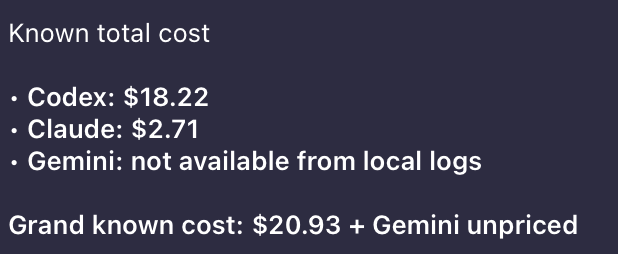
I’ve been burning through AI coding tools lately — Claude Code in the terminal, Cursor in the editor, the occasional Gemini CLI session, Codex for quick prototypes. It’s a great workflow, but it came with a nagging question I couldn’t easily answer: how much is all of this actually costing me?
Each tool lives in its own silo. Anthropic has a usage dashboard. OpenAI has another. Cursor stores sessions locally somewhere. Gemini CLI drops JSON logs in ~/.gemini/tmp/. None of them talk to each other, and there’s no single place to see the full picture.
So I built one: llmusage.
What Is llmusage?
It’s a CLI. You install it, run llmusage sync, and it goes and finds all your AI session logs and API usage data, throws it into a local SQLite database, and then you can query it however you want. No cloud account, no signup, nothing phones home.
# Install (no Rust toolchain needed)
curl -LsSf https://raw.githubusercontent.com/openrijal/llmusage/main/install.sh | sh

# Sync from all detected sources
llmusage sync

# See where your tokens are going
llmusage summary
That’s basically it.
And now you can ask your OpenClaw agent to install llmusage and then ask questions like: ** show me my llm usage in last 7 days ** or ** how much did i spend on claude code in last 30 days **.
Supported Sources
llmusage currently reads from:
| Source | What it reads |
|---|---|
| Claude Code | ~/.claude/projects/**/*.jsonl |
| Codex | ~/.codex/archived_sessions/*.jsonl |
| Cursor | <config_dir>/Cursor/.../state.vscdb |
| OpenCode | ~/.local/share/opencode/opencode.db |
| Gemini CLI | ~/.gemini/tmp/**/chats/*.jsonl |
| Anthropic API | /v1/organizations/usage |
| OpenAI API | /v1/organization/usage |
| Ollama | localhost:11434/api/ps |
Local tools are auto-detected — no configuration required. API providers just need a key set once:
llmusage config --set anthropic_api_key=sk-ant-...
llmusage config --set openai_api_key=sk-...
The Commands
I’ll go through each one. Nothing fancy here, just wanted to make sure everything is documented clearly.
sync
This is the one you run first. It goes through all your configured sources, pulls usage records, and deduplicates into the local db. You can also target just one provider if you don’t want to sync everything:
llmusage sync
llmusage sync --provider claude_code
llmusage sync --provider antigravity   # alias for gemini_cli
summary
Quick roll-up. Shows you total tokens and cost per provider/model for however many days you want:
llmusage summary              # last 30 days (default)
llmusage summary --days 7
llmusage summary --provider anthropic
llmusage summary --model opus
daily / weekly / monthly
If you want to see trends over time rather than just totals — I use daily a lot:
llmusage daily
llmusage weekly --weeks 12
llmusage monthly --months 6 --provider openai
llmusage daily --days 30 --json   # machine-readable output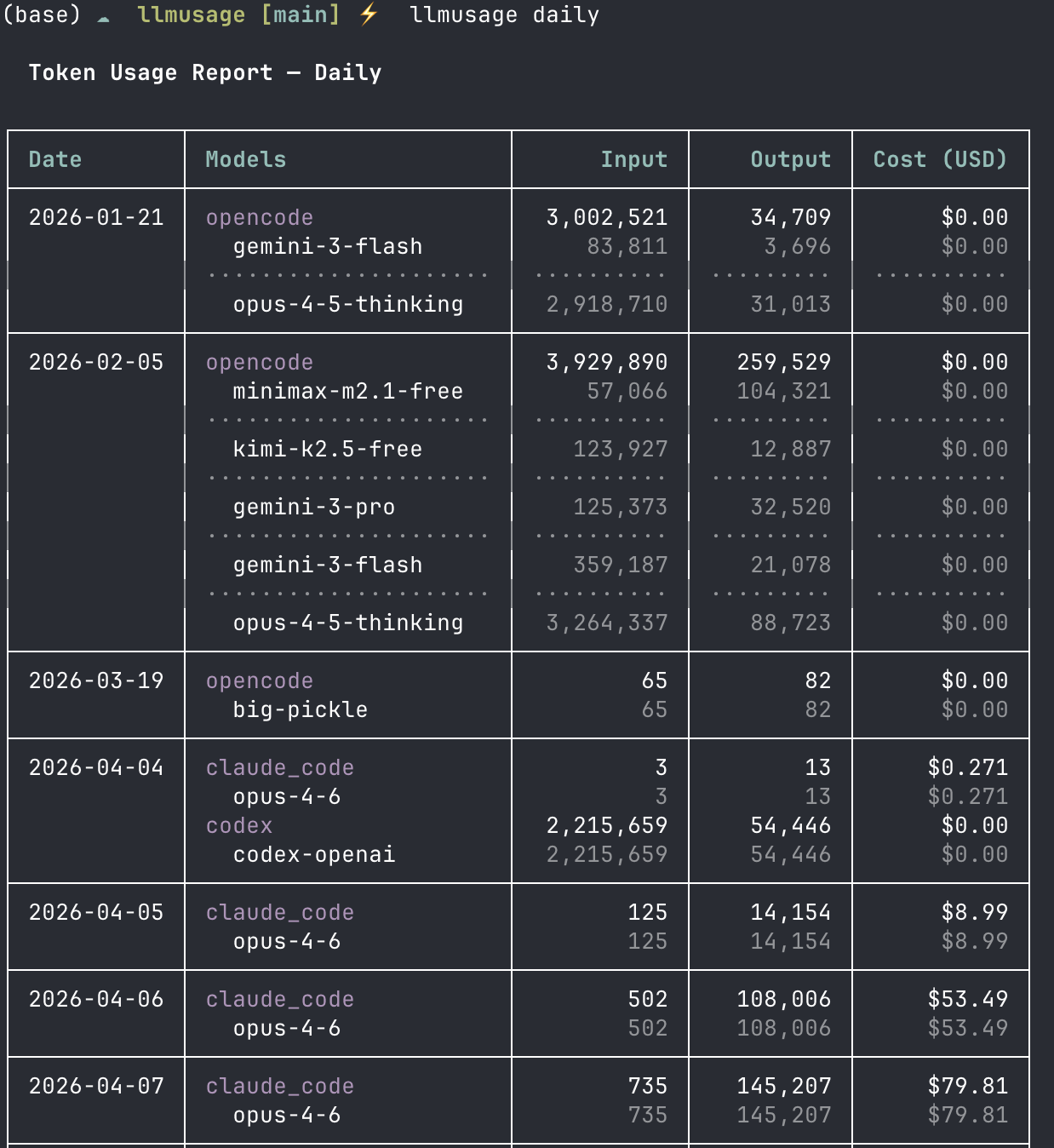
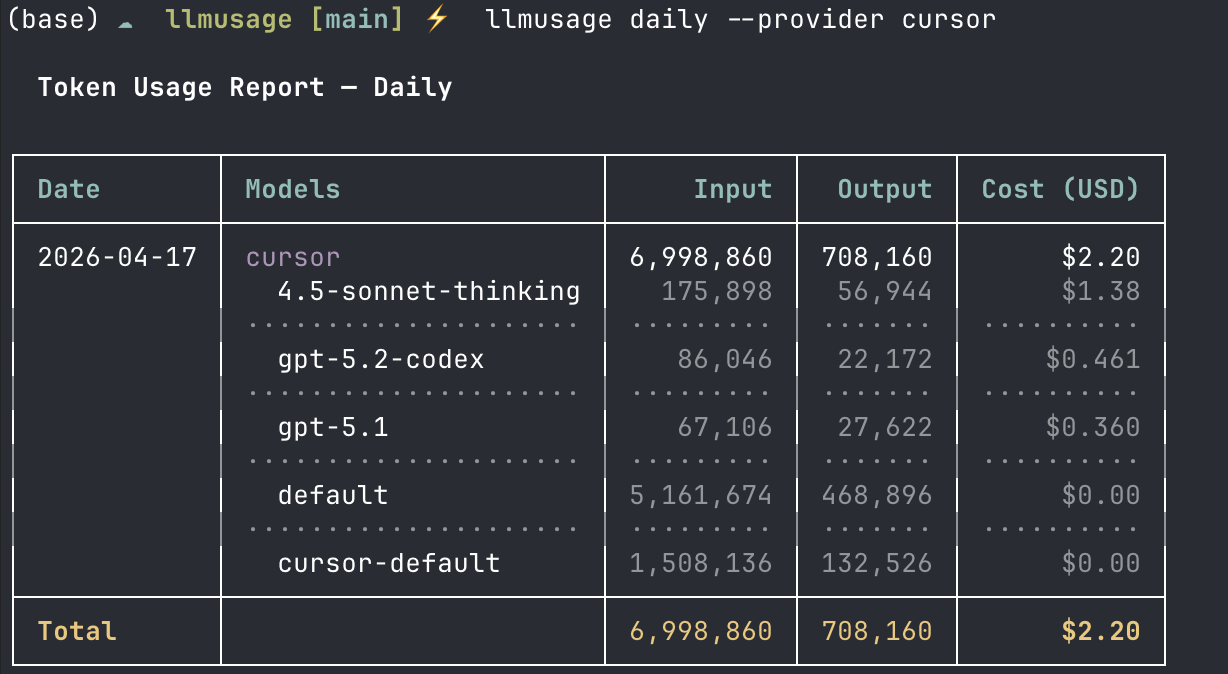
You can also filter down to a single tool. Here’s what my Cursor usage looked like today:
detail
Goes per-record. Good if you want to audit a specific session or figure out which model ran up costs on a particular day:
llmusage detail --model opus --limit 100
llmusage detail --since 2026-01-01 --until 2026-01-31 --provider claude_code
models
Shows you what models llmusage knows about and what they cost per million tokens. Pricing data comes from LiteLLM so it covers a lot:
llmusage models
llmusage models --provider anthropic
export
If you want to take the data somewhere else — a spreadsheet, Grafana, whatever:
llmusage export                          # CSV to stdout
llmusage export --format json --output usage.json
llmusage export --days 7 --output week.csv
Why Rust?
Well, when I started writing the specs, I had Python in mind. I know Python, and have built cli tools with it. But when I ran this through my spec driven development workflow, Claude Code asked me: do you wanna do this in Python or Rust?
I then did an adversarial review with Codex, and it suggested Rust.
NOTE: BTW, if you don’t know about this you’re missing out. You can basically install this Codex plugin in Claude Code and then it gives you certain workflows like /codex:adversarial-review which is pretty cool if you wanna get a second opinion on the plan, or /codex:review if you wanna get a review of code changes before creating a PR.
Anyway, back to the topic. A few reasons. Single static binary means no runtime dependency issues — you curl the install script, it downloads the right prebuilt binary for your platform (macOS Intel, Apple Silicon, Linux x86_64/aarch64), and you’re done. No Node, no Python, no nothing.
Performance is also nice when you have months of session logs to parse. And the Rust ownership model made it straightforward to handle SQLite with WAL mode safely across async collectors.
Intentional Omissions
A couple of tools I deliberately left out:
- Windsurf — I investigated (I mean I asked Claude Code) the local artifacts on macOS and couldn’t find reliable token counts. I’m not going to surface inaccurate data.
- VS Code (generic) — Extensions expose session metadata but not token counts. Same problem.
If either of those changes in a future version of the respective tools, I’ll revisit. But, also if you know better, please let me know. Ping me on Twitter/X @opynrijal. Also did I say this is Open Source, so please feel free to contribute.
Architecture
If you’re curious how it works under the hood — it’s pretty simple honestly:
CLI (clap)
|
SQLite DB  (dedup index, WAL mode)
|
Collectors (one per source, async)
├── claude_code   ~/.claude/projects/**/*.jsonl
├── codex         ~/.codex/archived_sessions/*.jsonl
├── cursor        <config_dir>/Cursor/.../state.vscdb
├── opencode      ~/.local/share/opencode/opencode.db
├── gemini_cli    ~/.gemini/tmp/**/chats/*.jsonl
├── anthropic     /v1/organizations/usage
├── openai        /v1/organization/usage
└── ollama        /api/ps
Each collector runs independently and async, so one failing (like Ollama not being up) doesn’t block the rest — you’d have seen that in the sync screenshot above. Deduplication is handled at the DB layer so re-running sync is safe. Pricing comes from LiteLLM’s public JSON, fetched on first sync and cached at ~/.cache/llmusage/litellm_pricing.json.
Installing
Easiest way — just run the install script. No Rust toolchain needed:
curl -LsSf https://raw.githubusercontent.com/openrijal/llmusage/main/install.sh | shDrops the binary into $HOME/.local/bin by default (or /usr/local/bin if you run as root). You can also override the path with LLMUSAGE_INSTALL_DIR or pin a specific version with LLMUSAGE_VERSION=v0.1.2.
On macOS, Homebrew works too:
brew install openrijal/tap/llmusageOr if you have the Rust toolchain:
cargo install llmusageAnd if you just want a pre-built binary, grab one from GitHub Releases directly.
What’s Next
There are open issues on the repo — provider requests, UI improvements, and things I just haven’t gotten to yet. Two things I want to build next:
- A
watchcommand — live token tracking as a session is running - A TUI dashboard mode for a quick at-a-glance view
If you use AI coding tools and want to actually know what you’re spending, try it out. It’s MIT licensed, open source, and I’m actively working on it. PRs welcome — CONTRIBUTING.md has the details.